HemeLB Performance Report
A test submission of HemeLB, available on the HemeLB GitHub repository master branch.
Disclaimers
- This is not a commentary on code quality, but an indicator of the quality of the current SHAREing testing methodology as of this date, 20/03/26.
- This forms only a preliminary assessment of submission suitability and does not guarantee a full assessment. The pre-assesment will be provided to the submitter with information on how to continue to assessment or rejection.
Preassessment Overview
- 1: Code
- 2: Description of working environment
- 3: Building
- 4: Running
- 5: Code complexity
- 6: I/O
- 7: Assessment structure
1: Code
The main codebase for HemeLB can be cloned with
git clone https://github.com/UCL-CCS/HemePure.git
We use the master branch for analysis.
2: Description of working environment
Here we describe some details of the system we will be running on and how we are configuring the software environment.
2.1: Hardware information
We run on Hamilton, one of the HPC clusters hosted at Durham University. There are 120 standard compute nodes and 2 high-memory ones:
| Specification | Per node |
|---|---|
| Processors | 2x AMD EPYC 7702 64-Core Processor |
| Clock | 3289.415MHz |
| Sockets | 2 |
| Cores | 128 |
| RAM | Standard: 256GB (246GB available to users) High-memory: 2TB |
| Local storage | 400GB SSD |
Each socket on each compute node is divided into 4 NUMA domains that each have a dedicated memory channel. Each of these NUMA domains are further split into 4 groups, where each has its own 16MB L3 cache (totalling to 256MB in one processor). Each of these groups contains 4 core that each have 512KB of L2 cache and 32KB of L1 cache.
2.2: Dependencies
We require a C compiler, MPI library and CMake for building
module load gcc openmpi cmake
Giving an environmental setup of:
Currently Loaded Modulefiles:
  1) gcc/11.2        2) openmpi/4.1.1   3) cmake/3.18.4
We also do not have to manually set any environment variables or add any paths.
3: Building
The build scheme is split into two phases: building dependencies then building the source code, listed below.
Dependency build
- Create
dep/build/directory andcdinto it - In this directory run
ccmake -B. -H../and press c to configure then e to exit - Then back at the command line configure with CMake using
cmake -DCMAKE_C_COMPILER=gcc \ -DCMAKE_CXX_COMPILER=g++ \ -DCMAKE_CXX_FLAGS="-g" \ -DHEMELB_COMPUTE_ARCHITECTURE=NEUTRAL \ -DCMAKE_CXX_EXTENSIONS=OFF \ -DHEMELB_USE_VELOCITY_WEIGHTS_FILE=ON \ -DHEMELB_INLET_BOUNDARY=LADDIOLET \ -DHEMELB_WALL_INLET_BOUNDARY=LADDIOLETSBB \ -DHEMELB_OUTLET_BOUNDARY=NASHZEROTHORDERPRESSUREIOLET \ -DHEMELB_WALL_OUTLET_BOUNDARY=NASHZEROTHORDERPRESSURESBB \ -DHEMELB_LOG_LEVEL="Info" \ -DHEMELB_USE_MPI_PARALLEL_IO=OFF \ -DCMAKE_BUILD_TYPE=Release \ .. - Then run
makeindep/build/
Source code build
- Create
src/build/directory andcdinto it - In this directory run
ccmake -B. -H../and again press c to configure and then e to exit - Then back at the command line configure with CMake using
cmake -DCMAKE_C_COMPILER=gcc \ -DCMAKE_CXX_COMPILER=g++ \ -DCMAKE_CXX_FLAGS="-g" \ -DHEMELB_COMPUTE_ARCHITECTURE=NEUTRAL \ -DCMAKE_CXX_EXTENSIONS=OFF \ -DHEMELB_USE_VELOCITY_WEIGHTS_FILE=ON \ -DHEMELB_INLET_BOUNDARY=LADDIOLET \ -DHEMELB_WALL_INLET_BOUNDARY=LADDIOLETSBB \ -DHEMELB_OUTLET_BOUNDARY=NASHZEROTHORDERPRESSUREIOLET \ -DHEMELB_WALL_OUTLET_BOUNDARY=NASHZEROTHORDERPRESSURESBB \ -DHEMELB_LOG_LEVEL="Info" \ -DHEMELB_USE_MPI_PARALLEL_IO=OFF \ -DCMAKE_BUILD_TYPE=Release \ .. - Run
makeinsrc/build/
4: Running
With the build instructions documented, we now run through the necessary information for running the code.
4.1: Data
The code requires input data which is hosted on Zenodo. Here we chose the test data in TestPipe.tar.gz, in particular the /nobackup/<username>/NVIDIA-TestPipe/input_VP.xml input file.
4.2: Runtime commands
mpirun -np xx hemepure -in input.xml -out results
where input.xml is the file in the path: /nobackup/<username>/NVIDIA-TestPipe/input_VP.xml.
5: Code Complexity
Next to no scaling information is given in the documentation. There are input files given to generate a weak scaling, though we do not yet include that in the analysis here as the internode analysis is still under development.
6: Memory, Storage and I/O
For the TestPipe examples the peak memory consumption given by the sacct command is approximately 17.6GB. The storage for the input files in TestPipe is 15MB, and the storage for the outputs is approximately 4.8MB.
The code has an initial stage of reading in data from disk, and then writes to disk at discrete intervals throughput the runtime.
7: Assessment structure
Finally, we list the elements of the code we analyse and the associated tools.
7.1: Assessment Dimensions
We have identified that out of the five performance dimensions, the ones relevant to this assessment and benchmark are:
- Core-level assessment
- Intranode assessment
- I/O assessment
7.2: Performance tools
For these three dimensions, at a high level we will use:
- Core-level: LIKWID
- Intranode: no tools needed, other than the inbuilt
timefunction - I/O: darshan
High-level performance assessment report
As discussed above, we restrict our assessment to CPU, intranode and I/O. This code has the functionality for both internode and GPU, though we do not consider these here as the GPU version of the code is distinct, and more works is required on the internode performance methodology for SHAREing.
CPU Analysis
For a basic high-level analysis of CPU performance, we look for the floating-point operation rate compared to the theoretical rate for the CPU.
The hardware capabilities were determined with
likwid-bench -t peakflops -W N:128*16kB:128
The software CPU compute rate was determined with
likwid-mpirun -np 128 -nperdomain N:128 -g FLOPS_DP -- ./hemepure -in /nobackup/<username>/NVIDIA-TestPipe/input_VP.xml -out results_core_128proc
| MFLOP/s | |
|---|---|
| CPU | 921372.41 |
| Measured | 30554.2358 |
We determine this software to have a CPU score of 0.033161657.
IO Analysis
For a basic high-level analysis of IO performance, we look for the proportion of the runtime spent processing IO requests.
The IO time was determined with
$ module load gcc openmpi darshan

$ export DARSHAN_DIR=/apps/developers/tools/darshan/3.3.1/1/gcc-11.2-openmpi-4.1.1
$ export DARSHAN_LOGDIR=./darshan_logs_4proc
$ LD_PRELOAD=$DARSHAN_DIR/lib/libdarshan.so mpirun -np 128 ./hemepure -in /nobackup/<username>/NVIDIA-TestPipe/input_VP.xml -out results_io_128proc
We process these logs with
$ darshan-parser --perf darshan_logs_128proc/darshan_log_id.darshan
which gives a few important lines. One for POSIX
# shared files: time_by_cumul_io_only: 0.028255
one for MPI-IO
# shared files: time_by_cumul_io_only: 2.020328
and finally one for STDIO
# shared files: time_by_cumul_io_only: 0.010979
Therefore, the I/O operations are split across POSIX, MPIIO and STDIO. This gives total I/O (reads, writes and metadata operations) runtimes of 0.028255s, 2.020328s and 0.010979s for POSIX, MPIIO and STDIO, respectively, averaged across all 128 MPI ranks.
For a total runtime of 235s, the IO utilisation ratio is 0.008764094, and the IO score is 0.991235906.
Intranode Analysis
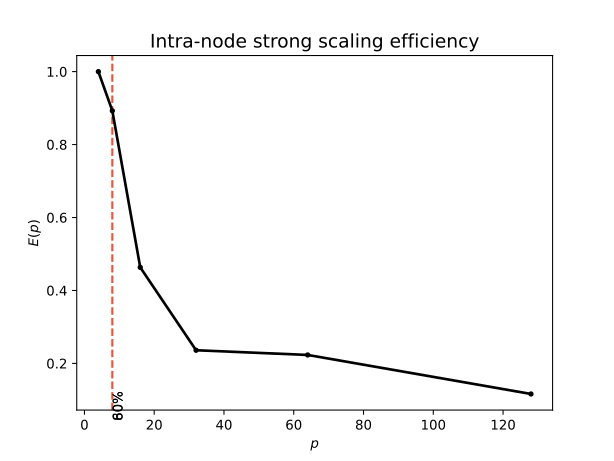
For a basic high-level analysis of intranode performance, we perform a strong scaling by fixing the problem size and increasing core allocation.
For this code, we tested with core counts in powers of 2 from 4 to 128.
| Thread count | Time (s) | Parallel efficiency |
|---|---|---|
| 4 | 3310.983 | 1.000 |
| 8 | 1854.760 | 0.893 |
| 16 | 1786.564 | 0.463 |
| 32 | 1753.458 | 0.236 |
| 64 | 927.553 | 0.223 |
| 128 | 891.100 | 0.116 |
Hence, our 80% threshold is at 8 cores and our 60% threshold is at 8 cores. As a proportion of the number of cores available, which is 128 on the node this was run on, this gives a score of 0.0625 and 0.0625.
Summary
The following table collates the results of all above sections. These scores are indicative only, and cannot truly be compared to one another meaningfully without taking into account domain knowledge and methodological differences between them.
| Result | Score | Metric result |
|---|---|---|
| CPU | 0.033161657 | 30554.2358FLOP/s |
| IO | 0.991235906 | 2.059562 |
| Intranode (80%) | 0.0625 | 8 cores |
In summary we can see that the I/O performance is extremely good, as the benchmark spends the vast majority of its time in computation. However, the core and intranode performance are considerably lower. Again the intranode scaling was performed relative to a 4 core run, rather than a serial run as is typical, though the single node scaling still drops off very rapidly.
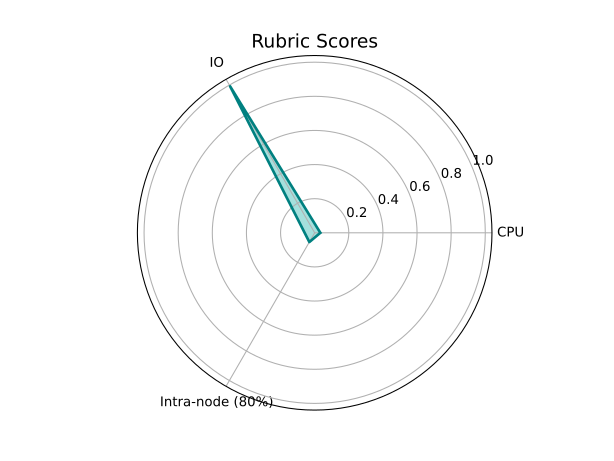
Following this high-level assessment, it is recommended that both the core and intranode performance are investigated in depth. Similarly, the GPU version of HemeLB must be analysed to study more compute rate that this benchmark can extract on a GPU. Finally, a internode analysis in the near future would be very interesting as HemeLB appears to focus on beyond single node scaling.