BabelStream Performance Report
We list here below an early performance report of BabelStream, a modern version of the STREAM benchmark which includes a multitude of programming models, and sits within the UKRI Living Benchmarks project. We have built this report on BabelStream because it is a user-friendly, synethetic benchmark and so is a good case study for beginning to test SHAREing’s performance methodologies.
We use the UKRI Living Benchmarks repository of BabelStream as the reference repository, linked here, and focus on the OpenMP (CPU) implementation.
Pre-assessment
We here document the workflow needed for the analyst to ready BabelStream for analysis. This assessment uses the Hamilton HPC cluster at Durham University.
Benchmark preparation
We clone the code from BabelStream’s repository
git clone https://github.com/UoB-HPC/BabelStream.git .
and use Version 5.0 as the reference code, as recommended by the Living Benchmark’s documentation
cd BabelStream
git checkout v5.0
Working environment
On the Hamilton cluster we require just a C++ compiler
module load gcc
We run all benchmarks on the multi partition which gives exclusive access to
whole nodes.
Compiler setup
We build the executable with
mkdir build
cd build
cmake -DMODEL=omp ../
make
We use the ‘out-of-the-box’ optimisations for now to see how BabelStream
performs as standard. However, we can also use MAQAO to check whether we are
using the maximum compiler optimisations available from the hardware.
Therefore, checking the
BabelStream/build/CMakeFiles/omp-stream.dir/flags.make file, the used
compiler flags are: -DNDEBUG -O3 -march=native -fopenmp -std=c++11.
Benchmark complexity
BabelStream is a modern port of the STREAM benchmark so the benchmark scales linearly with number of one-dimensional array elements. Out of the box the benchmark is set up with $2^{27}$ elements.
I/O
The I/O of BabelStream is incredibly minimal. There are no input files and the only output is written to standard output showing some information on the benchmark outcomes (e.g., measured memory bandwidths, etc.). Therefore, we neglect I/O from our analysis.
Machine details
A node on Hamilton is summarised below:
--------------------------------------------------------------------------------
CPU name:    AMD EPYC 7702 64-Core Processor
CPU type:    AMD K17 (Zen2) architecture
CPU stepping:    0
********************************************************************************
Hardware Thread Topology
********************************************************************************
Sockets:        2
Cores per socket:    64
Threads per core:    1
--------------------------------------------------------------------------------
Across a node there are 8 NUMA domains (grouped in 16 cores). Each core has an individual L1 and L2 cache, whereas the L3 cache is shared between 4 cores.
Labelling of code parts
The benchmark is very simple in its construction as it is just a wrapper for five compute kernels which are individually just singlarly nested for loops. One difference between BabelStream and STREAM is that BabelStream contains a ‘Dot’ kernel which contains a reduction operation.
Existing optimisations
This is not known, but the simple nature of BabelStream implies that this is not a concern.
Running
To run BabelStream, we simply use the command
./omp-stream
and we can set the number of cores through the OMP_NUM_THREADS environment
variable or through the SLURM resource statements in a job script.
High-level assessment metrics
Below we present results on the high-level performance metrics for BabelStream. As we only study the OpenMP (CPU) version of BabelStream our analysis is restricted to just two of the five SHAREing performance metrics: core, intra-node. Whilst we could measure I/O performance, BabelStream has negligible I/O and so this would not give any meaningful information on performance.
Core
The table below contains the core metric which is the proportion of maximum
peak FLOPS achieved by the benchmark. We measure the maximum peak FLOPS using
likwid-bench and then measure the peak FLOPS achieved by BabelStream using
likwid-perfctr.
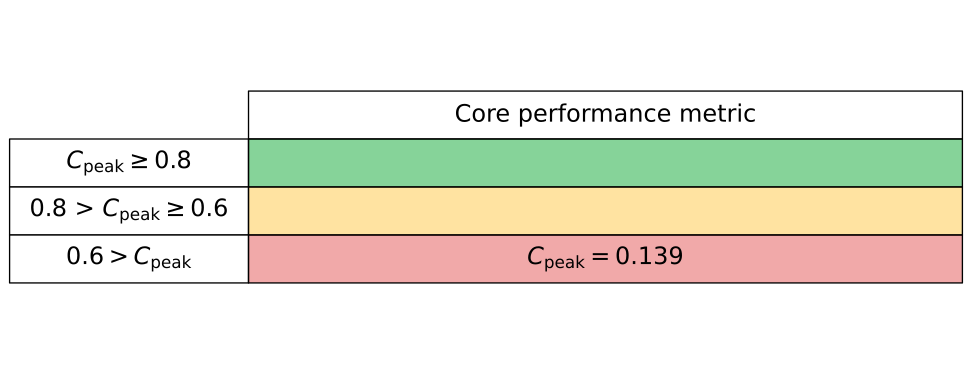
BabelStream is known to be a memory-bound benchmark used to test the memory bandwidth of hardware, and so it is perhaps not surprising that the compute rate is relative poor here.
Intra-node
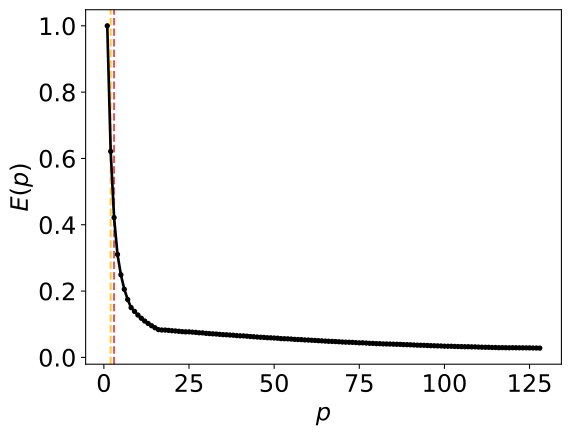
To investigate intra-node performance, we performance a strong scaling analysis of BabelStream and use runtime as our only observable. Below is the parallel efficiency computed here as the parallel speedup divided by the number of cores. Observing just purely the runtime of BabelStream shows a rapid decrease in the parallel efficiency. This is likely due to the relatively small problem size of BabelStream. The yellow and red vertical dashed lines show the core counts in which the parallel efficiency first drops below 80% and 60%, respectively.
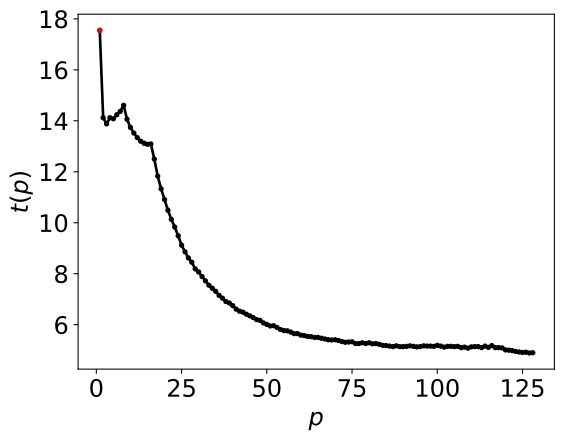
Below are the runtimes for the BabelStream strong scaling. These strong scaling
results were found by using likwid-pin and so we fill up the cores in order.
Hence we see features in the low core counts. For example, beyond 16 cores
there is a steady decrease in runtime and on this hardware we know that we have
then filled up the first NUMA domain. Below 16 cores we see slightly
unpredictable runtime behaviour and so it could be worth digging into details
of Hamilton’s configuration to potentially explain this behaviour.
The table below contains the intra-node metric. This metric is characterised by the ratios between the total available core count and the core counts at which the parallel efficiency drops below 60% and 80%.
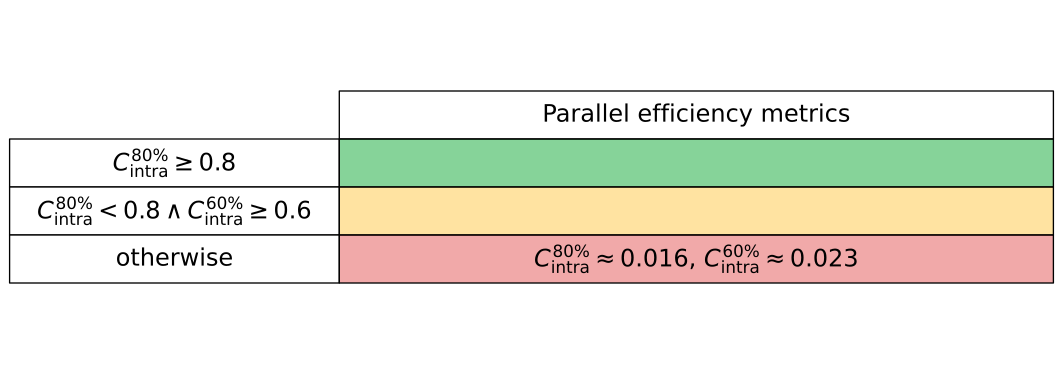
The system used for this assessment, Hamilton, has 128 cores per node, and so as the parallel efficiency results show above, BabelStream’s parallel efficiency drops below 80% and 60% for two and three cores, respectively. Hence, these metrics are heavily penalising because of the high number of available cores.
High-level summary
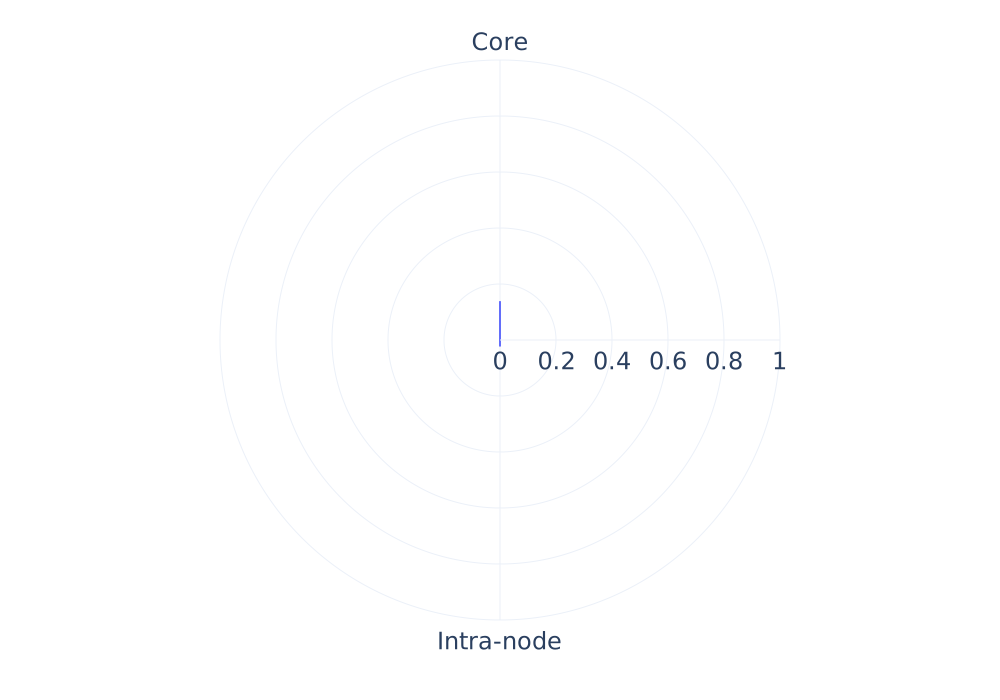
Below we summarise our two metrics in the form of a Kiviat diagram. We can see that both core and intra-node performance are poor here. Our core performance metric takes into account only single-core compute rate, and as BabelStream is a highly memory-bound benchmark this is perhaps not surprising. However, a more detailed analysis of the core performance issue is necessary.
Likewise, the strong scaling results are poor. This could in part be due to analysing a problem size which is ‘too small’, but again should be analysed in further detail at the intra-node level. Performance issues can rarely be decoupled, so it may be that these core and intra-node performance issues are inter-dependent.
This is an early performance assessment of BabelStream and so is not a complete performance report. As SHAREing’s performance methodology develops, this performance report will likely be modified and extended.
Lower-level core analysis
This is an early core performance assessment and will be subject to change
Now that the high-level metrics have found issues with the core and intra-node performance we begin lower-level assessments, beginning with core performance. To probe core performance issues, we focus our analyses on core areas that consume significant portions of runtimes. To do this we produce a serial profile.
I like the noting the code balance in loops, i.e., what is the data traffic to compute operations fraction. The point of this is two fold: 1) we can use this to do very primitive performance modelling; 2) this process is a useful step to get the analyst to reflect on the code present within these loops. Reflecting on the code is vital and helps the analyst explore:
- is their redundant work? Could the working set be reduced?
- are their expensive operations? Could lookup tables be used to avoid them?
- are their small functions called in loops? Could inlining be used?
- is their branching within loops? Following a review of the code, these features can then be explored to see if they lead to performance issues. For example, if there is branching we can use a tool like LIKWID to measure branch misses and see if the branching is limiting performance and then this can be a clear candidate for future optimisation.
Serial profile
We can produce a simple serial profile using gprof, or we can also use
perf which can also give information from
performance counters. Here we use perf record ./my=exe and this gives a
serial profile:
Samples: 68K of event 'cycles:u', Event count (approx.): 55329778369
Overhead  Command     Shared Object        Symbol
  22.60%  omp-stream  omp-stream           [.] OMPStream<double>::add
  22.54%  omp-stream  omp-stream           [.] OMPStream<double>::triad
  19.16%  omp-stream  omp-stream           [.] OMPStream<double>::dot
  17.13%  omp-stream  omp-stream           [.] OMPStream<double>::copy
  17.11%  omp-stream  omp-stream           [.] OMPStream<double>::mul
   0.57%  omp-stream  omp-stream           [.] check_solution<double>
   0.52%  omp-stream  omp-stream           [.] OMPStream<double>::read_arrays
   0.11%  omp-stream  omp-stream           [.] OMPStream<double>::init_arrays
   0.08%  omp-stream  libc-2.28.so         [.] __memset_avx2_unaligned_erms
This is just a snippet of the profile but highlights the functions which are responsible for the highest proportion of runtime. With prior knowledge of BabelStream (or STREAM) this is not surprising as this synthetic benchmark is just a wrapper around 5 kernels. The profile also shows us initialisation and checking steps for the arrays.
Context
When localising performance issues to functions and loops it can be useful to think of the context of the algorithm and whether what we are seeing is making sense. Again in this case it is clear that the 5 loops use up significant runtime, but if we, e.g., observed an initialisation function taking the most time then this is dubious as this function is not really part of the true ‘scientific’ workload for this benchmark.
We next want to dig into the most dominant kernels. This is up to the analyst,
but in this case it is relatively simple that we have 5 kernels of main
interest: add, triad, dot, copy and mul. To assess these 5 kernels we
want to work through steps to deduct or performance issues.
add
The kernel of this loop is given here:
c[i] = a[i] + b[i];
In this loop there are 2 loads, 1 store and 1 arithmetic operation. Crucially we do not see any other software features such as branching or other function calls here and really this loop should be an ideal candidate for vectorisation. MAQAO gives this loop a vectorisation ratio of 100%. We can see this quite clearly in the assembly code
0x402ec0 VMOVUPD	(%R12,%RSI,1),%YMM1
0x402ec6 VADDPD	(%R10,%RSI,1),%YMM1,%YMM0
0x402ecc VMOVUPD	%YMM0,(%RBX,%RSI,1)
0x402ed1 ADD	$0x20,%RSI
0x402ed5 CMP	%R11,%RSI
0x402ed8 JNE	402ec0
i.e., the loads and operations are vector loads and operations. Hence, with this loop being dominated by loads, and it seems as though all work is necessary, then with limited options for tweaking this loop, it is clear why this loop is heavily memory bandwidth bound.
triad
The kernel of this loop is given here:
a[i] = b[i] + scalar * c[i];
In this loop there are 3 loads (though scalar will likely be cached), 1 store
and 2 operations. Again there is no branching or other more complex features
and should be ideal for vectorisation, with MAQAO again giving a vectorisation
ratio of 100%. The assembly code uses fused multiply-add
0x4031f0 VMOVUPD	(%R10,%RCX,1),%YMM0
0x4031f6 VFMADD213PD	(%R12,%RCX,1),%YMM1,%YMM0
0x4031fc VMOVUPD	%YMM0,(%RBX,%RCX,1)
0x403201 ADD	$0x20,%RCX
0x403205 CMP	%R11,%RCX
0x403208 JNE	4031f0
hence all computations are vectorisedd. Therefore, once again this loop is dominated by loads and has limited options for optimisations, so it is clearly memory bandwidth bound.
dot
The kernel of this loop is given here:
sum += a[i] * b[i];
and immediately we spot 2 loads with one multiplication operation but now this
value is being added to the sum variable. It is not inherently clear how this
will effect the code so we check the vectorisation ratio again from` MAQAO and
we find 33%, so this is the first kernel we have that does not hit 100%
vectorisation. Indeed we can see this in the assembly
0x403540 VMOVUPD	(%R8,%RDX,1),%YMM4
0x403546 VMULPD	(%RCX,%RDX,1),%YMM4,%YMM0
0x40354b ADD	$0x20,%RDX
0x40354f VADDSD	%XMM0,%XMM1,%XMM1
0x403553 VUNPCKHPD	%XMM0,%XMM0,%XMM2
0x403557 VEXTRACTF128	$0x1,%YMM0,%XMM0
0x40355d VADDSD	%XMM2,%XMM1,%XMM1
0x403561 VADDSD	%XMM0,%XMM1,%XMM1
0x403565 VUNPCKHPD	%XMM0,%XMM0,%XMM0
0x403569 VADDSD	%XMM0,%XMM1,%XMM1
0x40356d CMP	%RDI,%RDX
0x403570 JNE	403540
The ADD operations to increment sum are not vectorised here, although we
still see vectorised loads and multiplications. Although this loop is likely to
be heavily bandwidth bound, the reported bandwidth of this loop is likely to be
less as the operations are not optimal. Indeed from the output of BabelStream
we see:
Function    MBytes/sec  Min (sec)   Max         Average
Copy        19747.159   0.02719     0.02750     0.02724
Mul         19659.555   0.02731     0.02748     0.02736
Add         21419.487   0.03760     0.03785     0.03767
Triad       21577.010   0.03732     0.03754     0.03741
Dot         16712.025   0.03212     0.03324     0.03237
Issue: the vectorisation is impacted by the form of this loop having to
updated the sum variable.
copy
The kernel of this loop is given here:
c[i] = a[i];
This kernel contains no operations, 1 load and 1 store. Checking with MAQAO we see a vectorisation ratio of 100% and indeed the assembly code is simple
0x402d40 VMOVUPD	(%RCX,%RDX,1),%YMM1
0x402d45 VMOVUPD	%YMM1,(%R11,%RDX,1)
0x402d4b ADD	$0x20,%RDX
0x402d4f CMP	%R10,%RDX
0x402d52 JNE	402d40
This loop is so trivial and fully vectorised that, in this current form, nothing can be optimised and the loop is heavily memory bound.
mul
The final dominant kernel is given here:
b[i] = scalar * c[i];
which contains 1 operation, 1 store and 2 loads although scalar will likely
be cached. Checking with MAQAO we see another vectorisation ratio of 100% and
the assembly is again limited
0x403040 VMULPD	(%R9,%RCX,1),%YMM1,%YMM0
0x403046 VMOVUPD	%YMM0,(%R11,%RCX,1)
0x40304c ADD	$0x20,%RCX
0x403050 CMP	%R10,%RCX
0x403053 JNE	403040
Next to no optimisations can be made here, and the code is highly memory bound so as with the other kernels if we assume that the working set cannot be reduced, i.e., there is no redundant operations then options are limited.
Core summary
Many core performance considerations are not listed here due to the simplicity of the kernels. For example, we have not had to worry about branching, expensive operations, inlining, etc. as these kernels are intentionally simple which restricts our analysis significantly. Likewise, BabelStream is a synthetic benchmark and so we cannot comment on reducing the workload because the 5 kernels are by definition ‘fully necessary’.
There are two main considerations:
- The
dotkernel may benefit from reworking to avoid the additions to thesumvariable, to increase the vectorisation rate. - If all operations are necessary then memory bandwidth is absolutely the limiting factor, and so this benchmark would likely benefit from GPU porting to exploit significant gains in memory bandwidth.
With these core performance issues noted, we can next move onto a lower-level intra-node analysis.